Image data and convolutional neural networks
%matplotlib inline
import numpy as np
import matplotlib.pyplot as plt
import seaborn as snss
import pandas as pd
plt.rcParams['xtick.direction'] = 'in'
plt.rcParams['ytick.direction'] = 'in'
plt.rcParams['axes.grid'] = True
plt.rcParams['axes.axisbelow'] = True
plt.rcParams['figure.dpi'] = 150
# Check available hardware
import torch
if torch.cuda.is_available():
print(f'GPU is available, using GPU {torch.cuda.get_device_name(0)}')
device = torch.device('cuda')
elif torch.mps.is_available():
print(f'Apple Metal Performance Shaders framework is available, using {torch.device("mps")}')
device = torch.device('mps')
else:
print(f'Hardware acceleration not available, using CPU')
device = torch.device('cpu')| Original | Translated | Coarsened | Super-resolved |
|---|---|---|---|
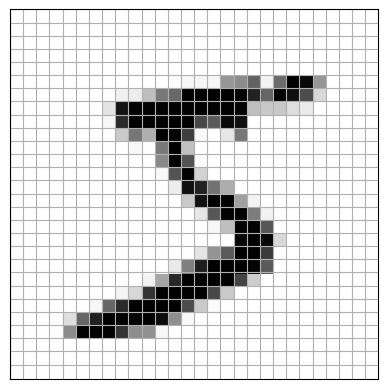 | 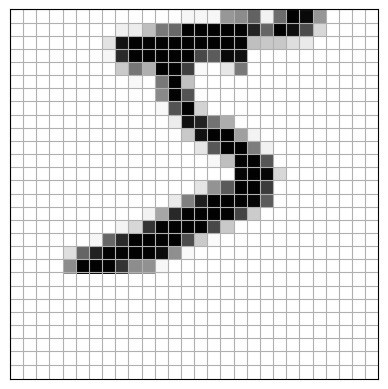 | 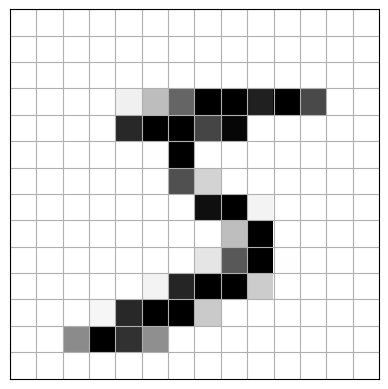 | 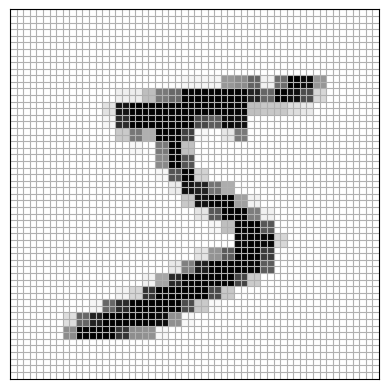 |
Compared to structured tabular datasets like Iris, images pose some particular challenges. For example, the four images above all contain the same object. But they would be viewed very differently by an MLP.
| Version | Vector |
|---|---|
| Original |  |
| Shifted |  |
| Coarsened |  |
| Super-resolved |  |
If we trained a MLP only on centered MNIST images, the shifted image might cause a completely different set of activations in the hidden layer, leading to misclassification. And the coarsened/super-resolved images would have sizes that are incompatible with the hidden layer weight matrix.
Animal vision tends to overcome these problems, and CNNs are loosely inspired by experimental results on the visual cortex. These experiments revealed a hierarchical structure with simple and complex cells. The simple cells identify features such as edges within narrow visual regions, or receptive fields. The complex cells probe a larger region and their activation is less sensitive on the exact position of an object within their view.
Visual perception, therefore, roughly follows this process
Convolutional neural networks (CNN) aim to learn feature maps that incorporate several key aspects:
Sparse connectivity - like simple cells, each output of a CNN layer accesses only a small region of the input
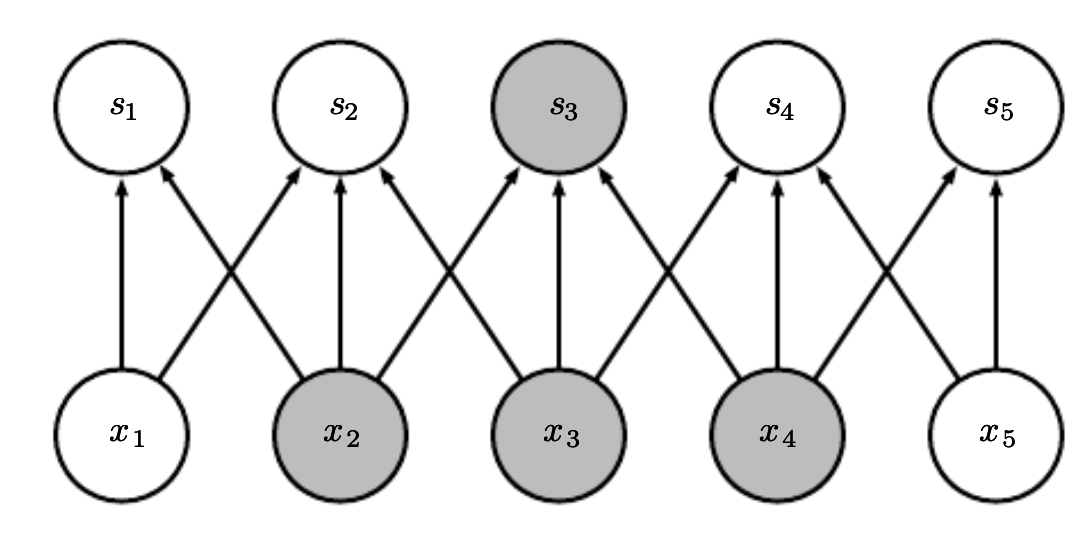
Weight sharing - like complex cells, CNNs produce outputs that are insensitive to position by applying the same weights at different places, and pooling the outputs
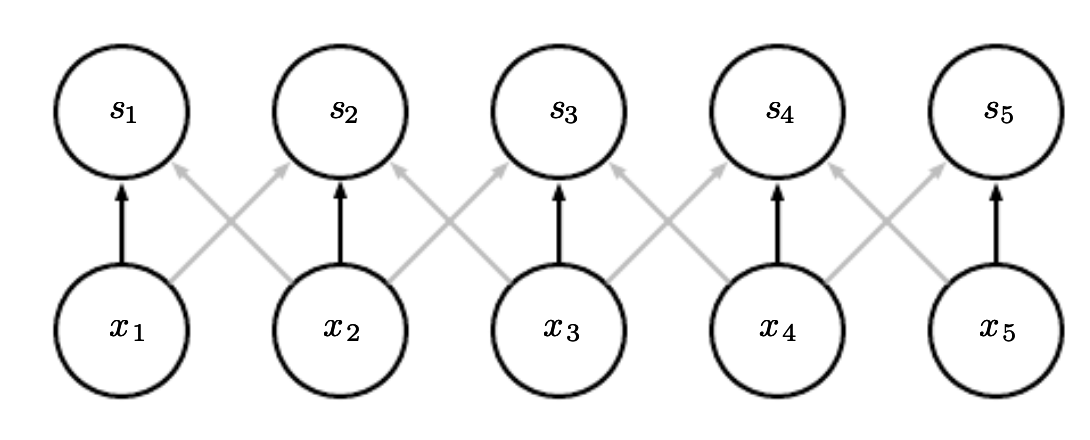
Combined, these properties give CNNs an important property called translation equivariance
Suppose we have a translation operator that acts on an image by shifting every pixel to the right by one: . A CNN layer produces a feature map that is equivariant to
The feature map of a shifted image is identical to the shifted feature map of the original image.
How do we possibly make this work in practice? That’s the focus of the lecture today.
What is a convolution?
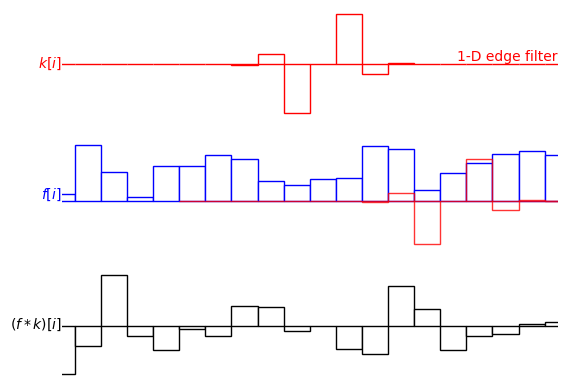
The convolution of two functions is
or equivalently
Loosely, it’s a way of “mixing up” two functions. We sometimes refer to as a weighting function, or alternatively a kernel function.
Convolution has several very nice algebraic properties which we don’t need to get into. Read more here.
Computers are finite objects. So in general, we cannot evaluate integrals with infinitesimally small differentials . Instead, we compute the discrete convolution using a sum
Note that we also cannot evaluate sums over infinite domains. So we often work with finite kernels such that
Implementing discrete convolutions
from math import floor

def discrete_convolution_1d(x, w, pad=0, stride=1):
    """ x is a numpy array of shape [N,]
        w is a numpy array of shape [k,]
    """
    N = x.shape[0]
    k = w.shape[0]
    out_size =


x = np.array([1, 2, 3, 2, 2, 5, 2, 1], dtype=float)
w = np.array([-1, 0, 1]) # 1-D edge filter (first-order)

print(discrete_convolution_1d(x, w, pad=1, stride=1))
print(np.convolve(x, w, mode='same'))
def discrete_convolution_2d(x, w, pad=0, stride=1):
N1, N2 = x.shape
k1, k2 = w.shape
x = np.random.randint(low=0, high=10, size=(5, 5)).astype(float)
print('For array x\n', x)
w = np.array([[-1, 0, 1], [-2, 0, 2], [-1, 0, 1]], dtype=float)
print('Our implementation:\n', discrete_convolution_2d(x, w, pad=1))
from scipy.signal import convolve2d
print('Scipy implementation:\n', convolve2d(x, w, mode='same'))Speeding up discrete convolutions
# For loops are slow, how can we speed this up?
print(f"x is a float array of size {x.shape}")
print(f"A stride along dim 0 is {x.strides[0]} bytes: x[0] = {x[0]}")
print(f"A stride along dim 1 is {x.strides[1]} bytes: x[0,0] = {x[0, 0]}")
from numpy.lib.stride_tricks import as_strided
def fancy_convolution_2d(x, w, pad=0, stride=1, verbose=True):
if verbose:
print("Input x = \n", x)
N1, N2 = x.shape
k1, k2 = w.shape
# Instead of running nested for loops, add strides to the array to get windows equal to our kernel size
if verbose:
print(f"X has shape {x_stride.shape} and strides {x_stride.strides}")
print(f"X[0, 0] = \n{x_stride[0, 0]}")
print(f"X[1, 1] = \n{x_stride[1, 1]}")
print()
print('Our implementation:\n', fancy_convolution_2d(x, w, pad=1))
print('Scipy implementation:\n', convolve2d(x, w, mode='same'))from time import time
x = np.random.randint(low=0, high=10, size=(100, 100)).astype(float)
t = time()
basic = discrete_convolution_2d(x, w, pad=1)
print(f"Basic convolution took {time()-t:.06f} s")
t = time()
fancy = fancy_convolution_2d(x, w, pad=1, verbose=False)
print(f"Fancy convolution took {time()-t:.06f} s")
t = time()
theirs = convolve2d(x, w, mode='same')
print(f"Scipy convolution took {time()-t:.06f} s")Example: Gradient filter
from PIL import Image
import seaborn as sns
from matplotlib.colors import ListedColormap
img = np.array(Image.open('images/emmy.jpg').convert('L')) # Grayscale image

from scipy.ndimage import convolve
filtered = convolve(img, w)

fig, ax = plt.subplots(1, 3, figsize=(8, 3))
ax[0].imshow(img, cmap='Greys_r')
sns.heatmap(data=w, annot=True, ax=ax[1], linecolor='black', linewidths=1, cmap=ListedColormap(['white']), cbar=False)
ax[1].set_aspect('equal')

ax[2].imshow(filtered, cmap='Greys_r')

for a in ax:
    a.axis('off')
Example: edge detection (Sobel)
from PIL import Image
import seaborn as sns
from matplotlib.colors import ListedColormap
img = np.array(Image.open('images/emmy.jpg').convert('L'))

from scipy.ndimage import convolve
filtered_x = convolve(img, w)
filtered_y = convolve(img, w.T)

fig, ax = plt.subplots(2, 3, figsize=(8, 6))
ax[0,0].imshow(img, cmap='Greys_r')
ax[1,0].imshow(img, cmap='Greys_r')
sns.heatmap(data=w, annot=True, ax=ax[0,1], linecolor='black', linewidths=1, cmap=ListedColormap(['white']), cbar=False)
ax[0,1].set_aspect('equal')
sns.heatmap(data=w.T, annot=True, ax=ax[1,1], linecolor='black', linewidths=1, cmap=ListedColormap(['white']), cbar=False)
ax[1,1].set_aspect('equal')
ax[0,2].imshow(filtered_x, cmap='Greys_r')
ax[1,2].imshow(filtered_y, cmap='Greys_r')

for a in ax.flatten():
    a.axis('off')
ax = plt.figure().gca()
ax.imshow(filtered_x**2 + filtered_y**2, cmap='Greys_r')
ax.axis('off');Convolutions and Cross-Correlations as a sliding dot product
Sketch this on the whiteboard
Image data often has multiple channels
from PIL import Image
import seaborn as sns
from matplotlib.colors import ListedColormap
img = np.array(Image.open('images/emmy.jpg').convert('RGB'))

fig, ax = plt.subplots(1, 4)
ax[0].imshow(img)
ax[1].imshow(img[..., 0], cmap='Reds_r')
ax[2].imshow(img[..., 1], cmap='Greens_r')
ax[3].imshow(img[..., 2], cmap='Blues_r')

for a in ax:
    a.axis('off')
# Convolution that mixes channels
from numpy.lib.stride_tricks import as_strided
def multichannel_convolution_2d(x, w, pad=0, stride=1, verbose=True):
N1, N2, c = x.shape
k1, k2, c_in, c_out = w.shape
w_array = np.zeros([*w.shape, 3, 6])
w_array[:, :, 0, 0] = w
w_array[:, :, 0, 1] = w.T
w_array[:, :, 1, 2] = w
w_array[:, :, 1, 3] = w.T
w_array[:, :, 2, 4] = w
w_array[:, :, 2, 5] = w.T
out = multichannel_convolution_2d(img, w_array, stride=1, pad=1)
print(out.shape)
fig, ax = plt.subplots(3, 3)
for ii in range(3):
ax[0, ii].imshow(img[..., 0], cmap='Greys_r')
ax[1, ii].imshow(out[..., ii*2], cmap='Greys_r')
ax[2, ii].imshow(out[..., ii*2 + 1], cmap='Greys_r')
ax[0,0].set_title('R channel')
ax[0,1].set_title('G channel')
ax[0,2].set_title('B channel')
ax[1,0].set_ylabel('x gradient')
ax[2,0].set_ylabel('y gradient')
for a in ax.flatten():
a.set(xticks=[], yticks=[])
a.grid(False)ax = plt.figure().gca()
edge = np.linalg.norm(out, axis=2)
ax.imshow(edge, cmap='Greys_r')
ax.axis('off')torch.nn.functional.conv2d?from torch.nn.functional import conv2d
out = conv2d(input=torch.FloatTensor(img).permute(2, 0, 1)[None],
weight=torch.FloatTensor(w_array).permute(3, 2, 0, 1),
stride=1, padding='same')
fig, ax = plt.subplots(3, 3)
for ii in range(3):
ax[0, ii].imshow(img[..., 0], cmap='Greys_r')
ax[1, ii].imshow(out[0, ii*2], cmap='Greys_r')
ax[2, ii].imshow(out[0, ii*2 + 1], cmap='Greys_r')
ax[0,0].set_title('R channel')
ax[0,1].set_title('G channel')
ax[0,2].set_title('B channel')
ax[1,0].set_ylabel('x gradient')
ax[2,0].set_ylabel('y gradient')
for a in ax.flatten():
a.set(xticks=[], yticks=[])
a.grid(False)